


Did You Know Google Marketing works well with Pointy, has its own Video Maker & Offers A Knowledge Graph?
Google Business Profile is a perfect place to keep your business updated correctly in Goole’s search engine and database, BUT sometimes getting ahead is about finding tips no one else is using!
So here are my Most Underrated Tips To RANKING in Google. Have you heard of Google Pointy? Discovered a lost Knowledge Panel for your Business? Or initiated your video marketing tool?
Video : 3 Underrated Google Marketing Tips To RANK
Timestamps to Video above
- 0:00 3 Underrated Google Business Marketing Tips
- 0:55 Entities are unclaimed optimization
- 1:50 More Traffic from Knowledge Graphs
- 2:16 Knowledge Graph search
- 3:05 Google Pointy for shop owners
- 3:35 Pointy will bring in extra local business
- 4:40 How does Google pointy work?
- 5:18 Shops can sell pointy with POS
- 5:45 A free marketing video from Google
Do you ever feel you just keep reading and hearing the same advice? Most local SEO advice is the same info get reviews, add posts, get authoritative links etc, but although this is absolutely true – sometimes there are some real gems that go amiss. Here are 3 little tools, tips or gems most SEO gurus never mention and few if any ever try using
Google Pointy For Marketing
Not every business is supported on Google Pointy. To check if you’re eligible for Pointy, go to Pointy.com. Pointy is generally available for businesses in the US, CA, UK, IE, and AU. Pointy works with physical retail shops, and in effect lets locals know what stock your shop sells and supplies. So its ideal for locally based stores but not for services working through e-commerce shops only
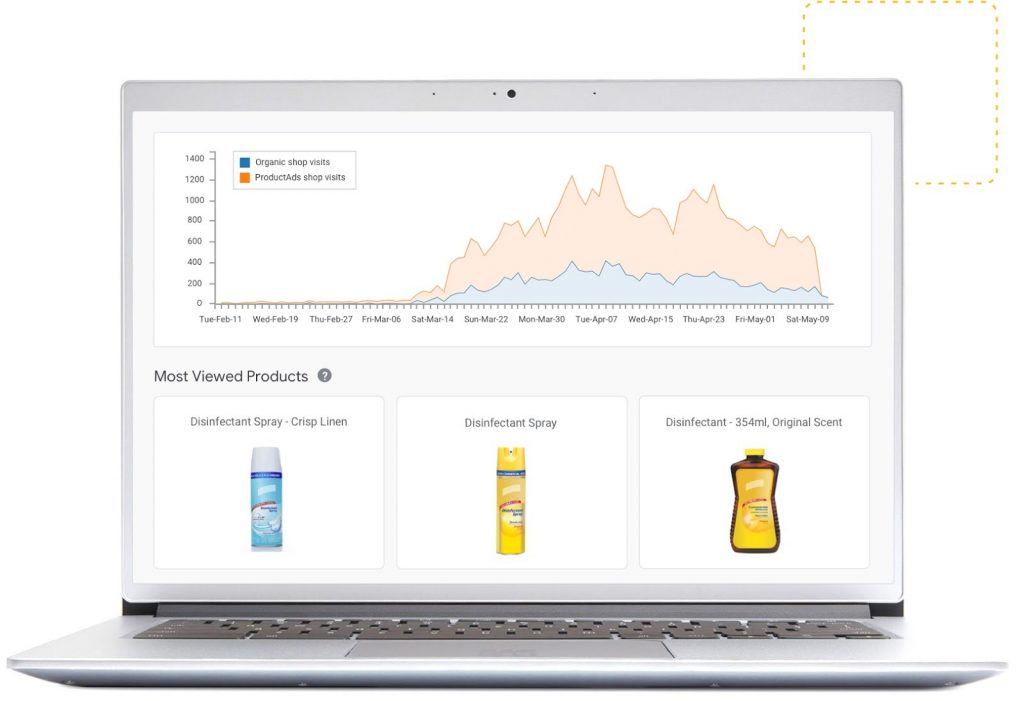
It is a way to add products to your database in Google. Pointy helps local shoppers find the products you sell in your shop. Google Pointy connects to your point of sale system and automatically adds using the scanner or a free app. see https://pointy.withgoogle.com/
Yes, it is, just add a small box between your barcode scanner and point of sale system, or download the app directly to your POS. It then adds your products automatically to Google maps, business and shop.
Go to https://marketingkit.withgoogle.com/videomaker/ and search for your business used to register on Google Business Profile, then just follow the steps in making your marketing video, see below
Here are the links mentioned in the video above
- Knowledge Graph Search: https://carlhendy.com/knowledge-graph-search/
- Get Google Pointy: https://pointy.withgoogle.com/
- Google Video Marketing Maker: https://marketingkit.withgoogle.com/videomaker/
- TubeBuddy SEO: https://www.tubebuddy.com/zanet
- Google Business Profile: https://posts.gle/d8ZtsW
- Additonal Google Business Profile Help: https://zanet.co.uk/google-my-business-4-levels/
How do you get Google Video Marketing Maker?
The video maker is surprisingly good if you make a few changes and then follow the process. I made this in 5 minutes see it below. Simply go to the Google Video Marketing Maker: https://marketingkit.withgoogle.com/videomaker/ and create a video for your customers.

Make changes to the images, reviews and photos until you are happy with it, then save it and publish it
Do You Have A Knowledge Graph Tip?
You’ve heard of Google My Business and how this gives you a load of real estate in the search engine. But what many haven’t considered is my next Google Marketing Tip. These tips are perfect for any business owner.
Google created a new Knowledge Graph/panel. Google does allow you to search its Knowledge Graphs using an api. Take a look at this for more info on my video and link above.
If you want regular tips from my Zanet YouTube Channel should combine and have a massive impact on your Google My Business rank for 2022.