


Lets look at some Google My Business posts examples so you can rank higher and get more clients.
Previously I looked at the importance of posting regularly and linking back to your authoritative domain. But today I’m going to reveal the powerful tool of Google My Business Offers.
This article will take a look at:
- How to find the area in Google My business to add offers
- A Video with my best tips and a real offer example
- Where you can gain traction on your competitors business
- Tips on how to fill out offers that attract new business
How can you write a Google My Business special offers to attract real customers and rank higher? These important tips in my article and video today will walk you through the process. By the end of this article you should be well equipped on how special offers for Google My Business posts will attract new clients.
Where to Add Offers to Google My Business
So in the past, special offers were no more than a way of writing a post. It had very limited value. Now its a proper designed layout with time frames, code promotions, terms and conditions etc. Clearly if Google gives you such a useful tool, then they want you to use it. Don’t write an Offer through Google My Business posts until you follow these suggestions. The suggestions below will help your offer stand out. As I’m going to reveal the power of images especially when you optimise with your business in mind.
Video: Google My Business Posts Examples
Timestamps for the video above
- 0:00 Overview
- 0:20 Some real gems about how to use images on posts and Offers
- 2:00 Jump onto on my GMB listing
- 2:20 multiple ways to get to my posts
- 2:50 Add an offer – where to find it
- 3:20 Working through the process of adding a new offer
- 3:40 You can add videos and photos
- 3:50 Geo tag your images – really useful tip at tool.geoimgr.com
- 4:30 How to geo tag your image
- 5:00 you can use your camera as an alternative
- 6:00 Google can read text on images and recognise logo and branding
- 6:20 Branding is very important in Google My Business
- 7:00 Give Google clear signals using your images
- 7:20 New ability to add additional images
- 8:20 Use of location in text may help provide an advantage too
- 8:50 Add the Google My Business Title for the Offer
- 9:30 Limited time and date on offers
- 10:10 Add Terms and Conditions, offer details etc
- 11:20 Use coupon Code so you know what the offer is and where it came from
- 11:50 Link to Contact page for coupon offer
- 12:10 Check your offer before submitting live
- 12:20 Give Google plenty to work with so you are seen as an authority
- 13:00 How the offer will look and appear in the google results
- 14:30 As seen on the Google My Business Website
Add Images to Boost Offers in Google My Business
Images are becoming more and more important as is video. We live in a very visual world and text and reading is becoming secondary to watching and seeing. So Google is playing ball by rewarding business that upload rich images and video content to there Google My Business listing. I want you to uncover some real gems about how to use images in posts and offers.
Add an offer – where to find it
Their are multiple ways to get to my posts, but if you click on the Posts are in the left menu (See #1) Then you will find the are where offers, events products and whats new exist. If you now select Add Offer you are now ready to add your first business offer. (See #2) Beforehand though you may of wanted to already established what offer you want to present and how long it will last. Its good to have something prearranged within the company i case you suddenly have a massive influx of enquires through it going viral on social media (this does happen!)

Google My Business Posts : Special Offer Example
Now you have the offer post in front of you and I would suggest working through each part of the form. Its presented in a logical order so lets take each one based on the screenshot below.
(See #3 below) Add Photos or Videos – You can upload more than one image here. This is where you can really build an authoritative offer as the majority of business don’t use the special offers post. If they do, they are unlikely to add an image or images with branding, text and Geo-tagging enabled. As explained in my video above these are incredibly powerful and will really improve the visibility of the offer because Google will rate it higher due to the richness of the image information. Make sure you watch the video above if you are unfamiliar with the process of adding Geo tag information to your images. If you use your phone camera to take pictures then you have probably enabled Geo-tagging to those images already. If you are using other images, then their is a really useful tool at tool.geoimgr.com.
It’s worthy of noting that most people have no idea that:
- For several years now, Google can read text in images
- So use of your location as text within the image may help provide an advantage too
- Google can recognise logos and branding
- Your business branding is very important in Google My Business
- Give Google clear signals by adding business information in your images
- Use the new feature and add additional images
Videos is another way of presenting complex offers, though I would avoid any video longer than a minute as it would put clients off in this particular format.

(See #4 ) The Google My Business Title for the Offer – Add an attractive and compelling title in the section. Try to use relevant keywords too, though this area is very limited.
(See #5) Start Date and End date (add time if needed) – Enter the calendar dates and make sure you have a limited time and date on your offers. If its too long it can lose its impact and appeal. You can even set it just for a day or a few hours. This is ideal for a Black Friday promotion or something similar.
This are also has additional details and its an optional area where you can then Add Terms and Conditions and Coupon codes, links to more details and places where the offer can be redeemed. Use this section to really nail the offer and integrate it with your website landing page. The offer details should totally align with what you have presented above.
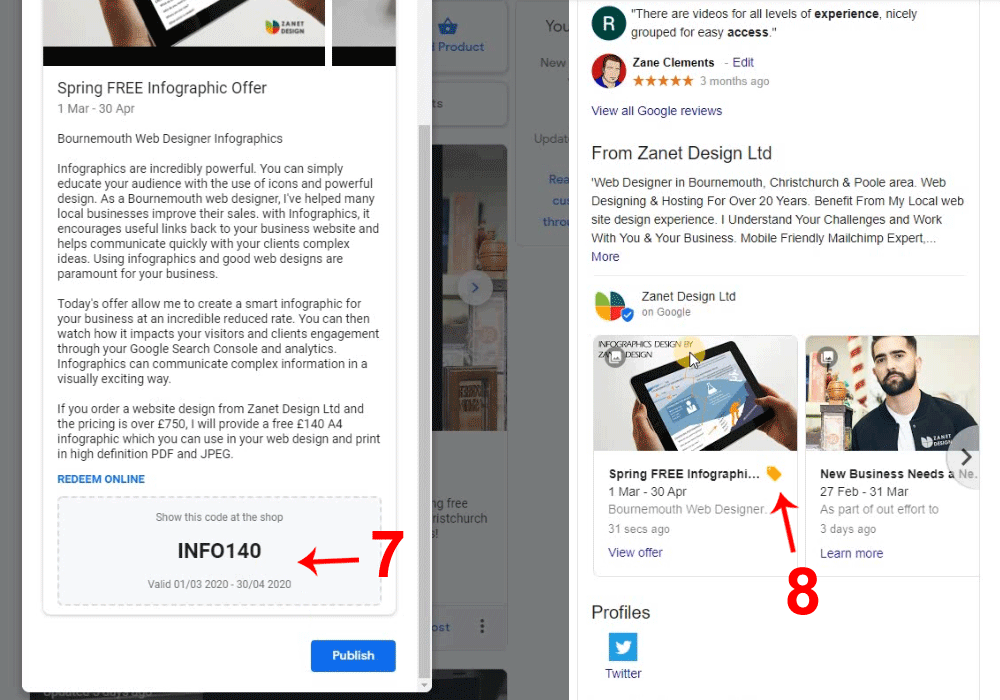
I use coupon codes so I’m able to know what the offer is and where it came from. The easiest way then is to add an optional input area for the code on your contact page. If your coupon has a little hint e.g. in my example I gave it “INFO140” it tells me 140 off an infographic web design. I can then check the offer for what terms i added. The coupon acts as a reminder and identifier. So this reminds me what the new client is going to expect by using the code.
(See #6) Preview then Go live with the offer. – Always Check your offer before submitting and making it live. You can now see how the offer will look and appear in the google results and your Google My Business Website.
(See #7 below) The coupon has a nice format and looks great.
(See #8 below) You will notice it also has a little orange tab to set it apart from other posts.
Conclusion
In conclusion, Special Offers in Google My Business posts are incredibly underrated and rarely used. It surely is worth having at least one offer current to set you apart. Unlike posts, offers do not expire after 7 days. you can use them for a month or two or even longer. Also some of the tips and tricks I’ve used in the video example can also be used in products and other whats new posts too. .
Google is empowering local business to use these offer promotions, now is the time to take advantage before it catches on and the competition has got ahead of you.
So please feel free to leave a comment and let me know if you have any questions. If you have a feature we havent covered or can think of a way this could be used as part of your GMB optimisation process then let me know.