


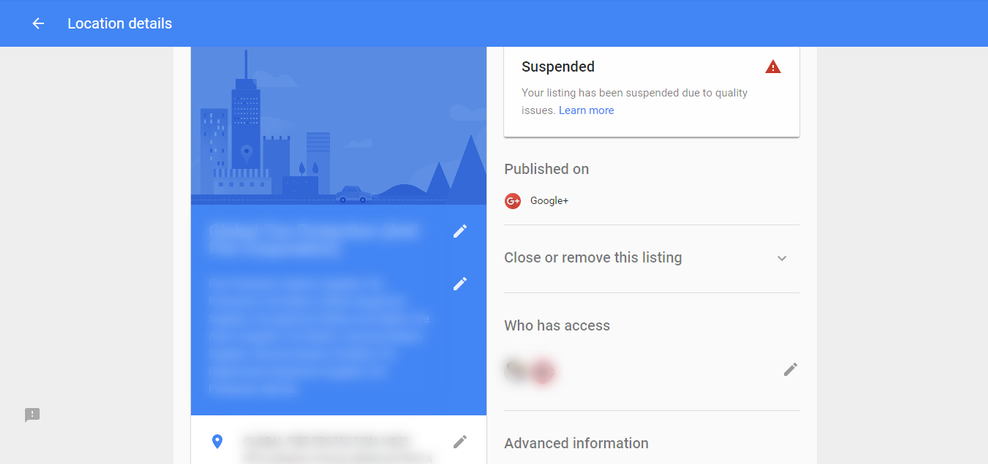
Google My Business suspended Due To Quality Issues is not what a business wants to see when you next log on.
In Google’s defence, When Google does suspends a listing, they are acting in the best interests of your customers and Google itself as I will go on to explain. What do you do when it says this location has been suspended due to quality issues on Google My Business? Don’t panic, it will usually be something pretty straightforward.
-
Product on sale
 The ALL IN ONE Download BundleOriginal price was: $72.00.$49.00Current price is: $49.00.

It simply means Google isnt happy with one of details you have entered. If it beleives its a genuine mistake this is known as a soft suspension and is easily fixed. See below.
It will normally be due to you breaking one of the guidelines. Simply analyse there information provided and you will locate where the issue is. Then remedy it and request reinstatement.
If you have multiple listings for one business or No physical location , registered an account twice or provided incorrect contact Information these are generally the most common suspension issues.
Google My Business Quality Issues Video
In today’s video I show you what a suspension looks like. Why you may of received it. What you can do about it initially. How to solve it if the first request isn’t successful. It can take time solving suspensions and issues with Google,but don’t despair. Its actually for your protection and looking after your brand.
Timestamps for this Google My Business video above. Click on the chapter and it will take you to the correct part of the video.
- 1:00 Introduction to Google My Business
- 1:25 The issue of having a suspended a Google My Business account
- 1:54 2 types of suspensions
- 2:08 Looking at the Google My Business screen cast
- 2:34 Showing status suspension on locations
- 3:15 Reasons for suspension list and quality issues
- 4:10 Why does Google suspend accounts?
- 4:35 what to do next in the process
- 5:00 Support page and process to fix Google My Business
- 5:42 2 types of GMB suspensions explained in detail
- 6:30 Concluding comments

If you want to know even more about how Google My Business can help your business gain local traffic for free, then you need to head on over to my Google my business tips and tricks article .
Google My Business Reinstatement Process
We are now going to look at 3 parts to the process. This is so you have a full understanding before you dive in with the reinstatement form. If you understand the process, your more likely to success first time and save weeks of suspension.
1. Why You May of Been Suspended By Google My Business Quality Assurance team
Why did Google My Business suspend you is the question you need to ask. Be honest with yourself Did you add something that you knew would be considered borderline?
Below are the most common reasons:
- Redirect / spamming links
- Tracking URL’s
- Multiple listings for one business
- Online-only businesses are disqualified from business listings
- No physical location or a PO box or a remote mailbox
- Registered an account twice
- Certain Business categories are considered a high-risk by Google and get more scrutiny
- Information or NAP is incorrect
- Service-area businesses must hide their address field

2. What type of suspension did the Quality Assurance team give you?
With a hard and soft suspension, its worth doing a search on Google Maps to see which one they gave. Its most likely to be a soft suspension which is a lot easier to cope with. If its the hard suspension then you are going to have to do quite a bit of work to get this turned around.
Soft Suspension Explained
You do a search in Google Maps and still see your business. Awesome. Your business has a soft suspension and requires reclaiming and re-verifying. You should find a quick change to the issue they found will get this resolved and the listing will be up and running.
Hard Suspension Explained
You do a search in Google Maps and can not see your business! Not Good!. Your business has a hard suspension Google My Business Team have probably removed your business listing from all search results. You need to follow the process below and make sure you read, understand and follow Google’s protocol and be very patient as it will take time.
3. Follow This Simple Process to Resolve Your Quality Issues
Just follow the process as is highlighted in my video above
- Complete the Reinstatement Form on https://support.google.com/business/troubleshooter/2690129?hl=en
- Let a few weeks pass by
- Look at the email from the quality assurance team hopefully they have removed the suspension
- If you receive an email from the Google My Business Quality Assurance team with your business is still in suspension call the Google My Business support team
- Discover why Google My Business Support team still feel your worthy of suspension and follow out their recommendations and implement them on your Google My Business Page
- Contact Google My Business Support and follow their protocols, and you’ll have a good chance of being reinstated and returning to your usual local search ranking.
- Re-apply again when you believe you cant fix anything else.
Conclusion
Getting a suspension for Google My Business sounds drastic. The message that says “google my business is suspended due to quality issues” is a scary notice. But It’s more common than you would expect. There are a lot of hoops to jump through when things go wrong so just keep a methodical process and keep patient and any honest business will be up and running again in no time. A large number of businesses across the country receive these notices. Follow the Video above, don’t contact me just contact Google My Business Support and you will be in the right place.