


What is the google site kit WordPress plugin?
Google site kit is the new plugin that small business owners and webmasters are talking about. It is a superb tool that can be downloaded and added to any WordPress install. Site Kit provides a very efficient way of using the Google webmaster tools and Google products from right within the WordPress admin area.

Google site kit released
Google site kit was released after 6 months of beta testing. They released Site kit version 1.0.1 this week and has a very simple easy to use interface Installing the plugin is simple too. The skill Google has is in providing a lot of statistics in an easy to comprehend interface. I think Google have done just that, with this plugin.
Why should I use Google site kit?
- Save time as you access from within the WordPress dashboard
- You have the data from within the same area you can edit pages and posts
- Installation is incredibly easy see (video link) So there is no need for source code editing to install it.
- The insights and statistics are live and direct from Google
- The stats are scalable and intuitive for any user.
How to Install Google Site Kit WordPress plugin Video
Timestamps for site kit plugin video
Click any of the times below and it will take you directly to the part of the video you want information on.
- 0:30 Overview of site kit plugin
- 0:50 Add new plugin
- 1:02 Site kit by Google plugin installed
- 1:26 Activate plugin
- 1:38 Verification setup
- 1:55 Site kit dashboard connected
- 2:18 activating page speed
- 2:35 Search console details
- 3:10 concluding comments
What do Google Site Kit services include?
Once you have installed the plugin, Site Kit requires you to authenticate your accounts by giving permission for the tool to access your accounts. When you have done so, expect an email from Google to alert you “Site Kit was granted access to your linked Google account”.
Page breakdown on statistics, keywords, visitors, page speed etc
It’s quite staggering how many stats are now at your fingertips from within the editor part of the WordPress page. So once your setup, its a breeze to get all the information you need about the page in question. login to WordPress visit the page and in the top banner sits all the site kit stats you could dream of.
I’m using my Only Fools website as an example of how the statistics look from within the dashboard and page view.

Drill further down on a page to get more details on keywords, search terms and landing pages

Google Site Kit allows WordPress users to access data from the following 4 Google products right from their site’s dashboard:
1 Search Console
2 AdSense
3 Analytics
4 PageSpeed Insights

Other services are available within the settings area. These include
- Optimize.
This enables you to set up and create a free A/B tests environment. This can help you drive metric-based design solutions to your site. - Tag Manager
Tag Manager creates an easy to manage way to create tags on your site without updating code.
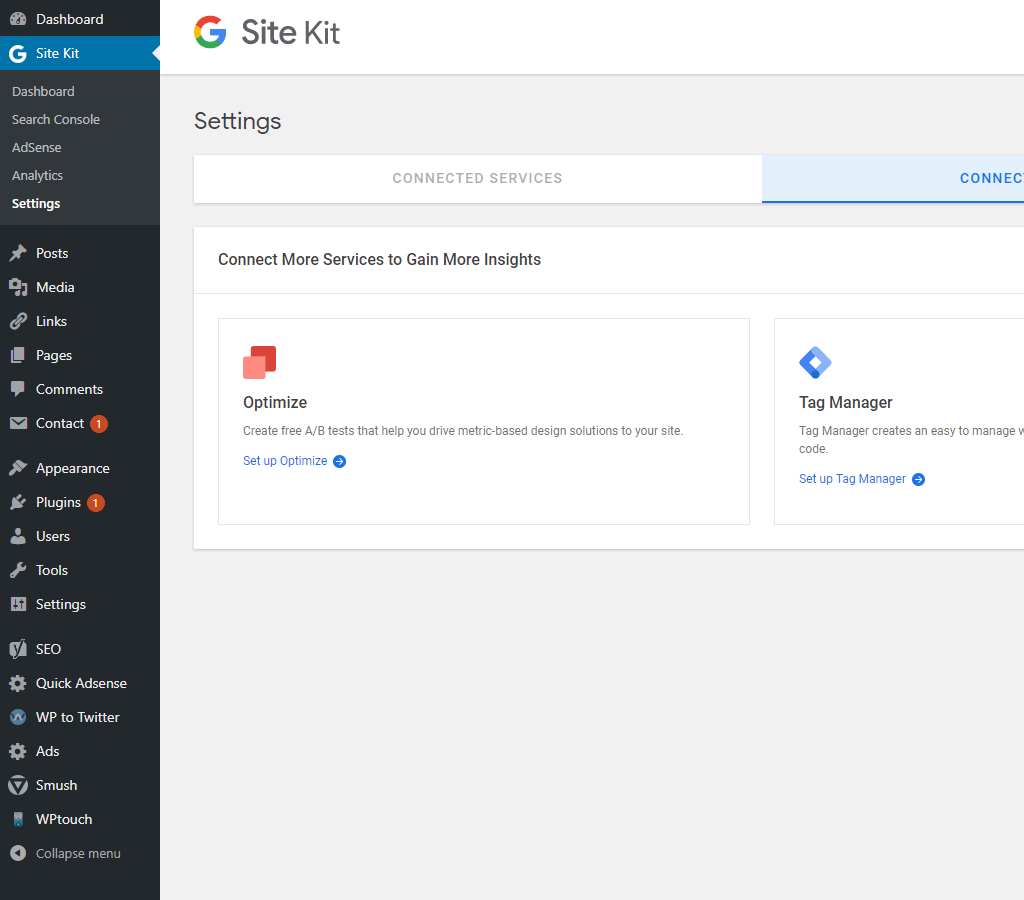
How to use Google Site Kit.
Google suggest the following process if you want to use it the way its intended.
A) Review the main dashboard on a weekly basis and check for any significant changes in how people are finding your site. Are people finding your site from a new place?
B) Keep track of how your recent posts are doing by checking the individual page reports.
Compare the top performing pages and how people found them. Is a particular topic or product attracting more visitors from social channels?C) Set up new Google services to get more interesting insights — for example, if you enable PageSpeed Insights and Analytics, you’ll be able to see whether page load time affects bounce rate.
From Google WordPress plugin page
Google site kit download
Alternatively you can download the Google Site Kit direct from the plugin page and then upload it to you plugin area. The best way to do this is to access your plugin are within your theme using an FTP tool. Filezilla or Smart FTP are amongst the popular free tools to help you do this is you are unable to download the way mentioned in our video tutorial.
Conclusion
For some reason the plugin hasn’t been given its deserved 5 star treatment in the intial release. Everyone likes to criticise Google. I Think this will save webmasters a lot of toing and throwing.
Installing google site kit plugin for WordPress is extremely simple, as seen in our video. Yet it will provide you with an incredible amount of information at your finger tips. The plugin is designed to make it a lot easier to access your analytics, search console information, traffic details, keyword improvement and all the other statistical details that normally request you accessing outside of WordPress. Surely that’s all positive if you want to grow your business on-line.