


Today we show you how to enable chrome tab groups in under 5 seconds.
If you don’t know what Google Chrome tabs are, they are the tabs that appear in your browser and up until recently you had very little control over them. One of the big problems were you end up with too many tabs cluttering up your Chrome browser. Google’s solution to help organise all the tabs you have open is Tab Grouping and it is awesome!. The Tab Groups feature provides neat, color-coded labelling for all your tabs.
This article will reveal to you:
- How I do it on a video tutorial
- How to enable tab grouping using a small URL
- You can even name the groups
- Some other features like dragging and colour coding
How To Enable Chrome Tab Groups Video Tutorial
I’ve heard its possible, but I didn’t realise you have to enable this feature first. So this video is a very simple guide to the process along with some really nice tricks.
The Code to Enable Chrome Tab Groups
So this is how I enabled chrome tabs with one URL in under 5 seconds
just copy this web address. Then you need to paste into your chrome URL area.
chrome://flags/#tab-groups
See the video above on how to do this if you havent viewed it already, and make sure you subscribe so you don’t miss out on the next release and video tip.

My videos are aimed at helping small businesses succeed. So if you use the excellent chrome browser and often have several browser tabs opened at once, this grouping of tabs trick is going to be a case of never looking back
You can even name the tab groups
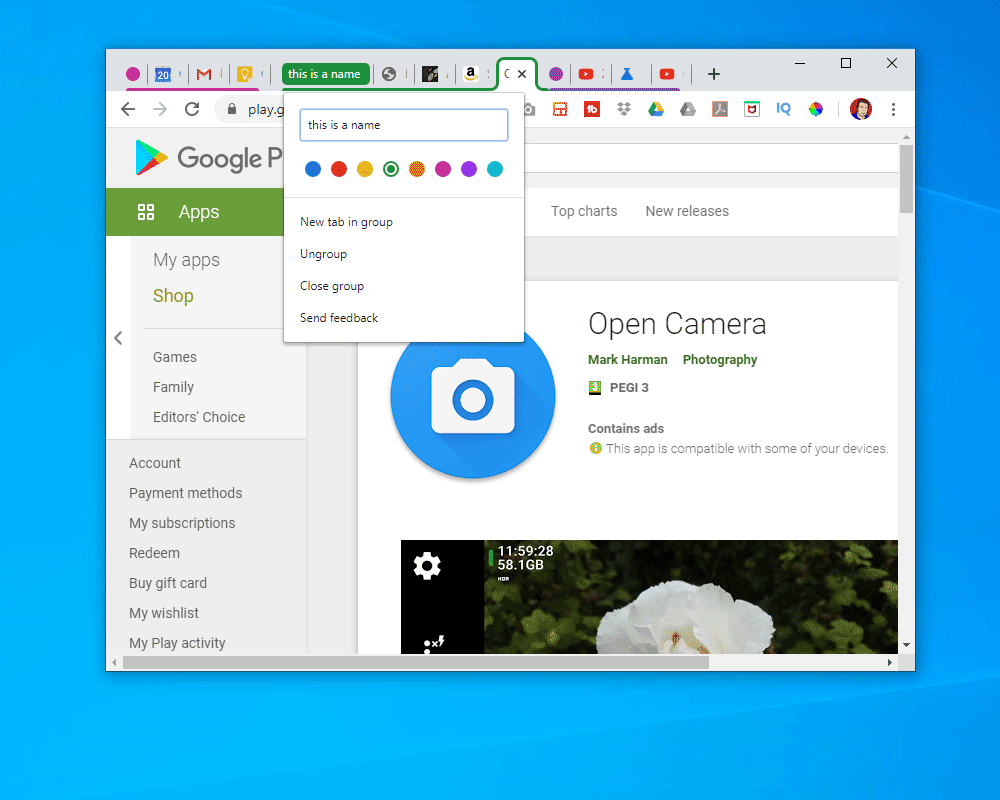
This might be obvious, but i missed this the first time round when i filmed the video. You can name your groups with the colour code – see screenshot below.
Other Tab Group features.
Drag and Drop
There are several other tricks you can do with the tabs. You can drag then and drop them from one coloured tab group to the other (see video)
Change Colours
You can change the colours and add new colours to the groups. Also new tabs a can be dragged into an existing group or they can have a new designated colour and group.
Close All in a Tab-Group
Once you have a group you can close all the tabs in the group down in one right click. I have a feeling that there will be even more features once this tool is fully adopted by chrome users.
Conclusion
Google love chrome. If you love chrome too, then I think you will wonder how you lived without the tab groups. its so simple but so useful as often Google products are
Every small business needs some website experience from time to time. Are you in need? Would you appreciate some clear advice tailored for your business? Then take action today! If you need help then contact me on my contact page and let me get your web design setup and some traffic through your website. Don’t let this opportunity pass you by while I have some spare capacity.