


Today I reveal the easiest way to make videos for Youtube on a zero budget .
Do You Want To Know How To Edit Videos For YouTube On PC For Free? Many of you have asked me recently what I use and how I produce my videos. With zero budget for a small business adding video is essential, but you probably expect to purchase thousands of pounds worth of equipment and this puts you off.
WRONG !
Small businesses need no budget to make business videos about your services or products.
So far I have spent less then £20 producing over 150 videos
In this article and video I will reveal to you:
- How to edit your YouTube videos on PC for free
- What video editing software I use for YouTube so its without a watermark
- What extras are needed and how you can get them for almost free
- The camera and tripod I use in my videos
- What video lighting I use and some links to help you out
Video: How To Edit Videos For YouTube On Pc For Free
The video you are about to watch is an insight into all my equipment and was used to make that very video
TIMESTAMPS for the above video
- 0:00 Introduction
- 1:36 The budget challenge for small businesses
- 1:47 Use YouTube Videos they are owned by Google
- 2:57 Use After Effects for video projects and titles
- 3:42 Using a camera phone and decent lens
- 4:27 Free Software for filming video called open camera
- 5:42 Use a tripod for your video
- 6:30 Edit Videos For YouTube with Shotcut
- 9:20 Lighting can you use a nearby window if not LED Ring Lights work well
Too cheap for a quality video?
Admittedly if I spent more money, I could improve immensely the quality of my videos, and over time I will do so, but the purpose of this video is to say, don’t make excuses. Just start with what you have.
The equipment is suffice to get started. Whats more important is how you edit and that’s why I think shotcut works as its very basic and ideal for beginners. It gives you a lot of control and for free.
Videos are essential for the majority of businesses
Every one of my 100+ videos have been made on my phone. So far I’ve spent £12 only. That’s over 100 videos with a budget of less than £20. Affordable for your business? What business couldn’t do the same and make some on their services, or look at their products and how they work. Or an interview or case study?
So today’s video shows you what tools I use to edit on my PC.
I Know I’m not the best out there, but all the same, if you are at home running a business. Or if if you have some time in lock down, surely now is the time to start making youtube videos.
Video communication is the biggest growth in search engines in the past 3 years. People want to see how you do it, not read how you do it. The attention span of your ccustoer has never been so small and they will go to the business that will show them what they do.
What video editing software I use for YouTube so its without a watermark?

Shotcut is my main preference. But there are many more parts to the process before it gets to editing stage. See my list below for the process I currently use.
So to make a YouTube video on your computer or laptop, you need to have the following:
- Youtube not other platforms as it enhances your results – GMB likes it / Vimeo, Facebook, TikTok and Instagram.
- Envato – With Themeforest you can use After effects and with the free month trial edit you files to provide openers and titles LINK: https://videohive.net/category/after-effect
- Camera phone – but for higher quality Samsung Galaxy A70 Dual-SIM 128 GB 6.7-Inch FHD+ Android 9 Pie UK Version Smartphone – Black available on https://amzn.to/3bnePq1
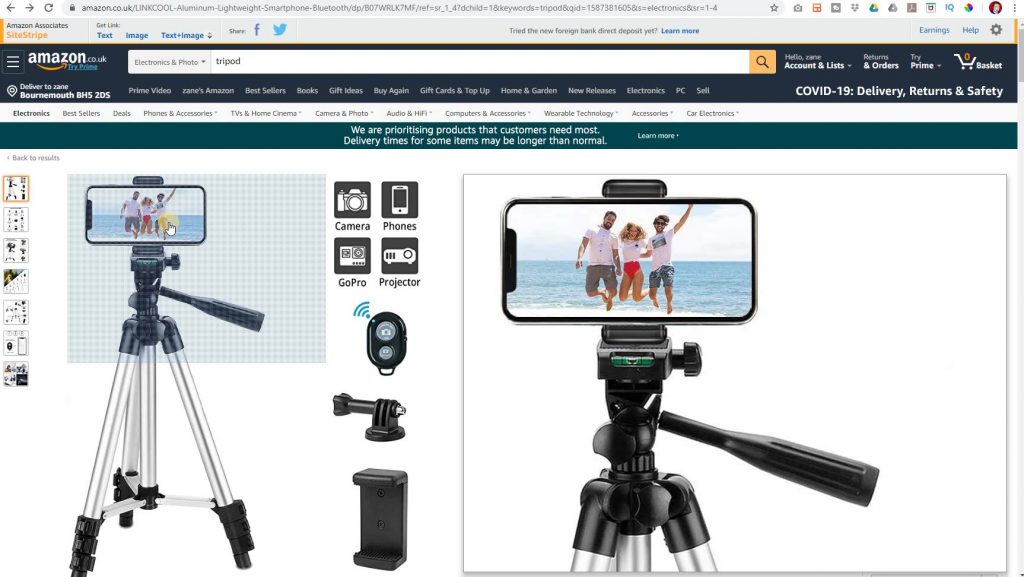
- Tripod – Mine was from the pound shop! Phone Tripod https://amzn.to/2XL0uj8
- Open Camera App – Free software Free that requires Android 4.0.3 or better. It produces High Definition Video on most phones, whereas your default camera app wont. https://play.google.com/store/apps/opencamera
- Shotcut – This is the editor of choice. Alterntively there are lots of freebies / mac / pc – keeping it simple is where Shotcut wins – Save your video as an MP4 then upload to Youtube
- Lighting – window LED Ring Light https://amzn.to/2xIXc5i
The camera and tripod I use in my videos
The camera is just a good lens on my phone, thats it. I dont use the front lens though as that doesnt give 4k definition. So use the better lens and a mirror behind so you can see yourself in your viewer / phone screen.
The tripod has one purpose, to hold your camera still. So if you have a phone, balancing it on books will be a novelty you wont enjoy. I found mine in the pound store. But if you dont get such a bargain then I would chose something like this Phone Tripod on Amazon https://amzn.to/2XL0uj8
What video lighting I use and some links to help you out
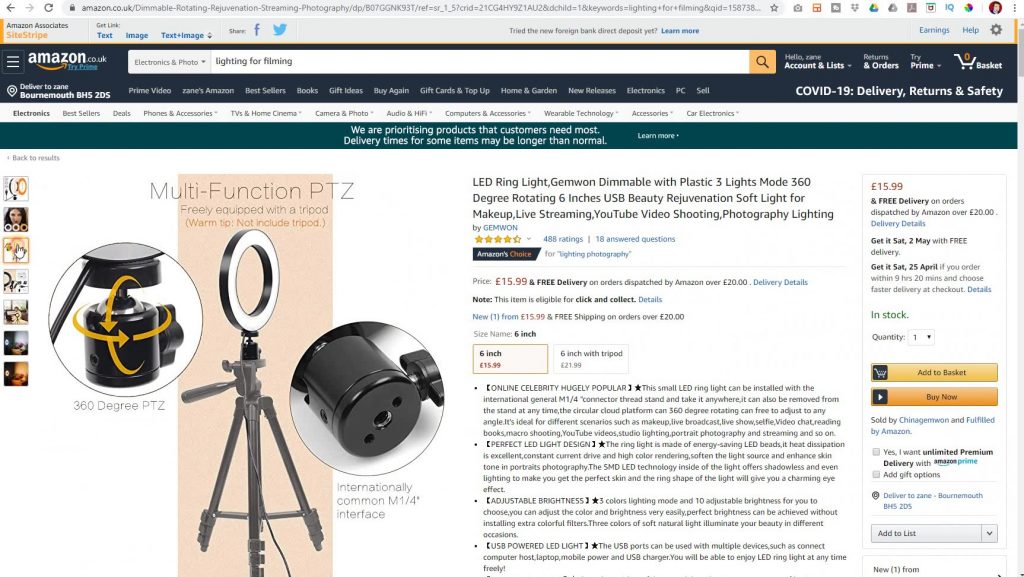
This multi-function light can be used if you don’t have a nearby North facing window or if you prefer filming in the evening when its dark – window LED Ring Light https://amzn.to/2xIXc5i
Conclusion
Don’t hold back from starting to make videos for your business. If you do, you may get left behind. It can’t be about the costs anymore. YouTube exposes your business to millions of interested viewers. So please do let me know how you get on and if you found this article useful.