


Small Businesses Get The Right Category and the Algorithm Rewards You Even Faster With This Free Tool
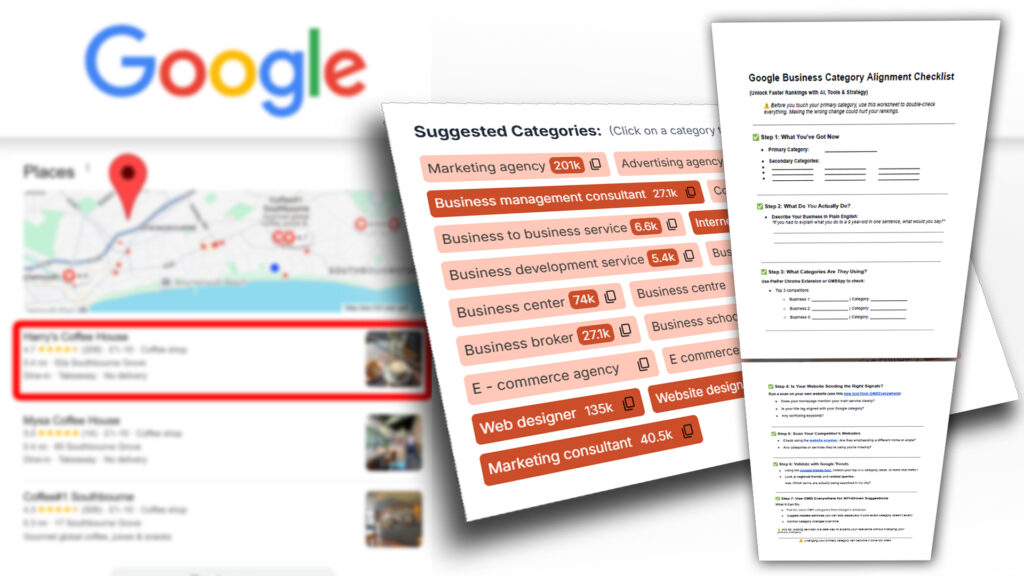
Grab My Free Tick Sheet below and Get More Local Leads From Google Traffic
Do you want to check the Google My Business Categories from your Competitor?
If you don’t know how to check google business categories on your competitors, you are like most other business owners. Google wants it that way. Or do you think category choice isn’t important? Think again. Your prime category has a massive effect on how Google will rank you in the so called local Google My Business 3 pack.
Would YOU love to know what are the best categories for your business? Would you ideally like to spy on what your competitor chose for his categories. Well the only secret is knowing what to do?
Additionally, Google hides your competitors secondary categories too. So today’s lesson along with its video will empower you. Then you can learn how to check google my business categories and implement them into your business. I also address the importance of only having a few categories.
This article will today answer the following questions on categories for local businesses:
- What are Google My Business Categories ?
- How to Find Competitors Google My Business Categories ?
- What is the best number of categories to add to Google My Business?
What are Google My Business Categories ?
Google states that you should only add categories that reflect exactly what services you offer. “You can’t create your own category. If the category you had in mind isn’t available, choose a more general category that still accurately describes your business. “ – Google
It’s fair enough. Imagine your a photographer and you have included a sub category for building. I’m the customer and I see you are listed as a builder due to it being a secondary category. My experience of Google My Business would be tarnished if after calling you on the phone, you said “Oh actually I’m a photgrapher, I don’t do building!”. If that sounds far fetched then see the example in the video on 3:50 A Photographer appearing under Property Maintenance in Oxford – whats that all about?
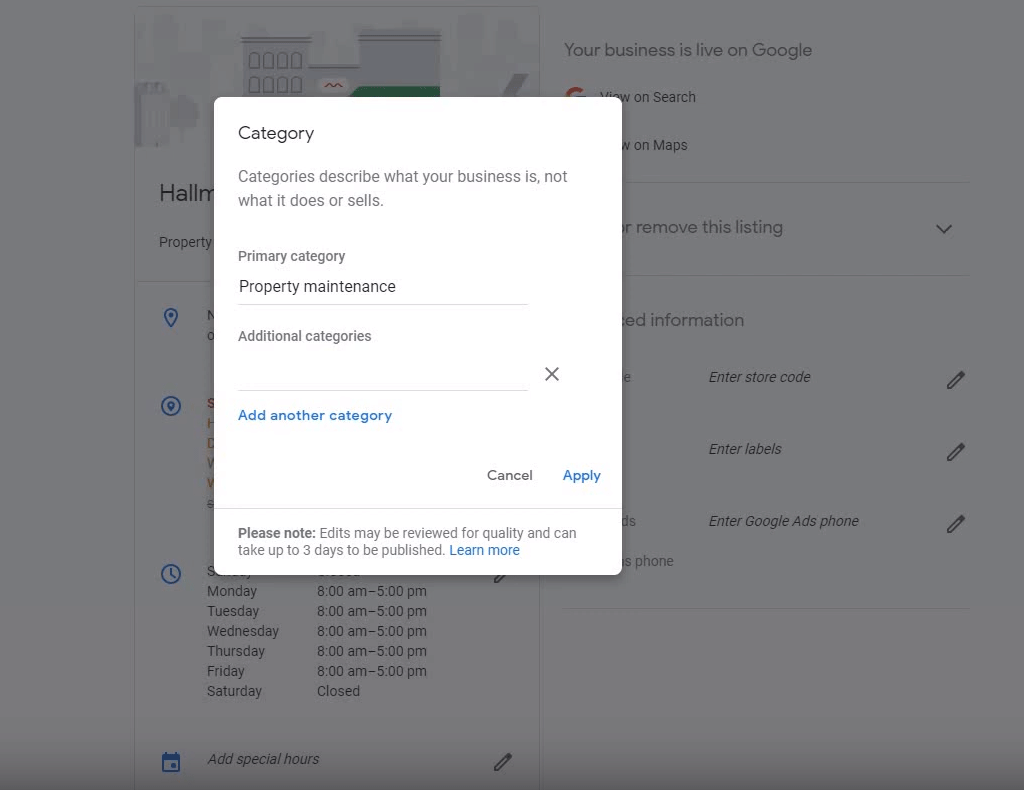
You will notice there is a primary category and then additional categories. Use these carefully as they will appear as you start typing. Its a lot easier when you know what is available and what success your competitors with a similar business are using. So this is where the main question comes in to play. How do I check google business categories on my competitors?
Video Timestamps
Click on the chapter and it will take you to the correct part of the video.
- 0:05 Overview
- 0:43 Introduction to Zanet Design
- 1:08 Why yo need a primary categories
- 1:40 Category overview on Google My Business
- 2:05 Choosing secondary categories tip
- 2:37 Competitors category process
- 3:00 Going into Google Maps
- 3:22 Competitors category results in Google Maps
- 4:08 Locating other sub categories
- 4:40 Search competitor in Google
- 5:14 Use price category in maps
- 5:30 View source in browser and find prime category
- 6:00 Also view hidden code for other categories
- 6:20 Ideal number of categories is currently 3
- 7:00 Concluding comments and integrating the new category
How to Find Competitors Google My Business Categories
The first thing to do is to notice that the primary categories show. So if you go to https://www.google.com/maps and type in your business, the main primary , or closest category will show as appearing next to the listed businesses.
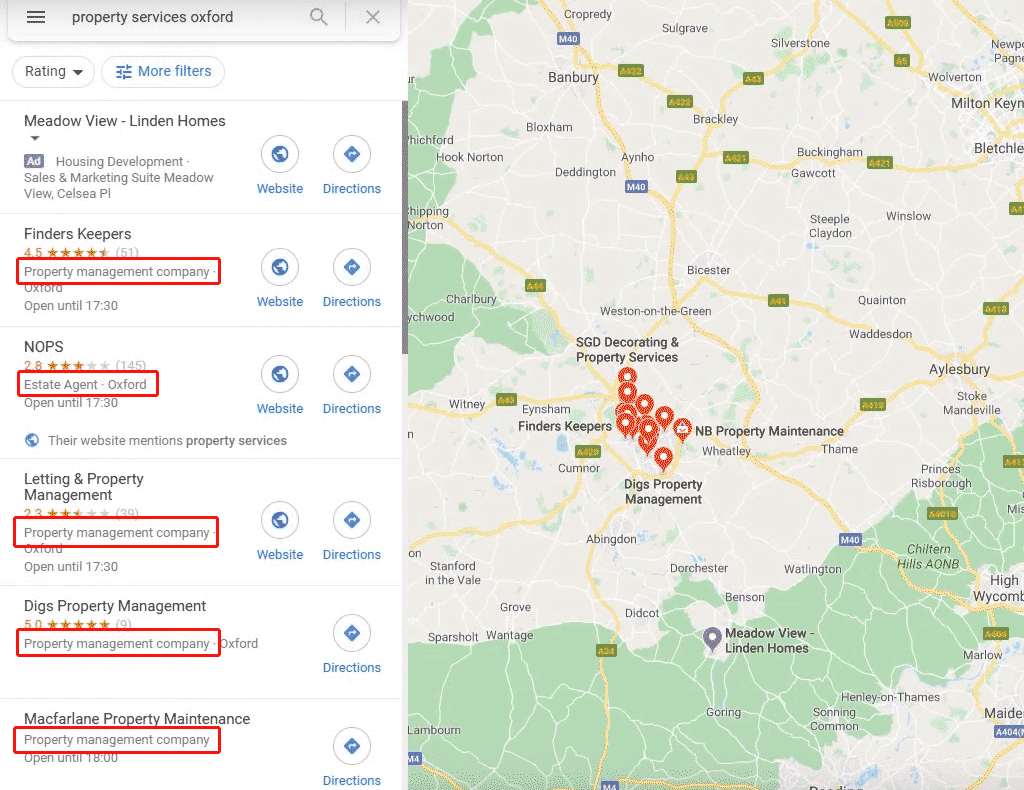
You will see not all the categories are the same. But this is a big clue if the majority are as to the primary category you should use for your business.
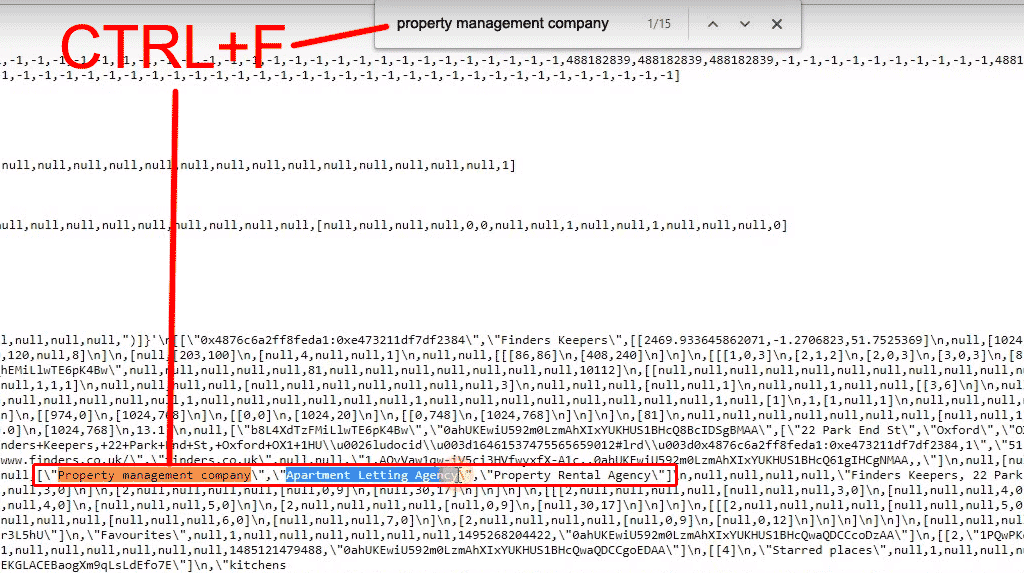
The next thing to do is to see what other categories they have used. to do this you will need to locate the competitors Google Business entree in Google maps. The video above does this so you can follow along at ( relevant part of the video 4:40 ). This is where you now do your “undercover” code hack. I use the Chrome browser. I believe most browsers like Firefox and Opera will let you use a “View Source Code”. What you are about to do is see what other categories they selected in the source code.
Research competitors google my business categories
If you now press CTRL+F to find or locate keywords in the code. So we know there prime category, use this in the code search and you will see along with some commas and slashes some other categories. These are your competitors hidden but selected categories. If you only see the word null then this implies they havent selected any.
What is the best number of categories to add to Google My Business?
- Initially you can add up to 10 categories (I’m not sure if this was dependent on the type of business)
- Currently you can register 1 main primary category along with 4 additional categories
- I made a study of other businesses using the above process. The results suggest that the most successful listings are concentrating on no more than 3 categories
- Google has supplied quite general categories with the idea the your business will always fall under at least one. I would struggle to justify falling specifically under more than 3.
- So my conclusion would be to use one very well chosen primary category and 2 supporting additional categories.
Have you seen this Google My Business Guide for 2020?
Most business haven’t discovered these really useful tips yet. So before you disappear, head over to our article and video called 3 google my business hacks to get-ahead in 2020
Conclusion
I work hard to make sure my article is designed to help you. The purpose of this one was to explain what Google My Business categories are and where you can find them. Then I’ve provided you with clear direction of how to locate the hidden code that reveals how to find competitors Google My Business categories. Finally I raised the question as to what is the best number of categories to add to your Google My Business listing? So my current suggestion would be to use one very well chosen primary category and 2 supporting additional categories.
If you are a local business and want to have help with your business entree, or any of the above, then don’t hesitate to contact me. I’m a web designer in the Bournemouth, Christchurch or Poole area and I’m currently available to help. Alternatively feel free to comment below and I will do my best to answer your questions.