


Are you one of the 60 million active business owners using Facebook and need to link it to Google My Business?
Today I’m going to show you how to link Google My Business To Facebook. Today’s video will give you 5 tips. I’ve aimed this at helping Facebook businesses, but if you are already running a Facebook and Google My Business accounts, this will also provide some great optimisation tips.
FACT: Facebook ads have 6 million businesses paying to advertise. If they optimised Google My Business with there Facebook business, they could improve results for FREE
This article will show you how :
- VIDEO: How To Link Google My Business To Facebook
- How to Add Facebook Reviews on Google Business
- How to Show Social Media in Google Knowledge Panel
- Add Facebook page to Google My Business
- Use a Google My Business post for Facebook page
- Link from GMB to Facebook link and calendar bookings
- Summary: Google My Business and Facebook
VIDEO: How To Link Google My Business To Facebook
Facebook was launched on Feb 4th 2004 as just a basic communication and rating device amongst university students at Harvard. Today it has 2.50 billion monthly active users. Many of these are now run as small local businesses.
Have you ever asked how do I link my business’ Facebook reviews to my Google Business page? or How to link Facebook reviews to my Google Business? Here are all the answers.
Near the end of the video, I have an awesome bonus on how to get clients to go from GMB to using the Facebook calendar bookings
How to Add Facebook Reviews on Google Business
Earlier this year Google released an update that showed ratings from other 3rd party social platforms. So a rating on Yell, Yelp, Facebook, Check-a-trade or several of the dining ratings have made appearances. This means a rating or Facebook review now shows on Google Business Knowledge Panel.
How to get reviews on Facebook to appear on GMB
- Ask customers to fill out a review on your Facebook business page
- Facebook produces a score rating out of 5
- Google spider crawls the web and if it finds a rating on your Facebook page, can automatically via an algorithm add the rating to your Google My Business Knowledge Panel (see video above for example)
- You will then gradually notice Facebook reviews along with others, appearing on Google My Business panel results.

Did you know?: Google My Business has a Facebook page at https://www.facebook.com/GoogleMyBusiness/
How to Show Social Media in Google Knowledge Panel
Google My Business can display Social Icons within the Knowledge Panel. These icons include a link to Facebook. To run a good chance of these icons appearing you will need to make sure your website links through to your Facebook site. How can you do this?
I would add your social media links including Instagram, Twitter and Youtube on the footer. Then another Google algorithm will pick these up and start displaying them. You can see how to do this and add markup language to encourage Google in this video below.
The Right Way to Add Facebook and Other Social Media Icons!
Social media on the footer of your website will help Google’s algorithm start adding social links automatically on your listing. So follow the video above if you haven’t done this already.
Google does this automatically via an algorithm. Make sure that the business details on both your Facebook page and your Google page are exactly the same – this helps Google identify that the two are linked.
Add Facebook page to Google My Business
There are 3 components to doing this that you will need from the Facebook page
- Save the image to a local area
- Copy the text onto your clipboard
- Locate the URL of the Facebook page or use the default home page for your Business account
- Now head over to Google My Business and add an update under post
- Add the 3 components (I do this in the first video if you want to see it being done live in GMB)
Use a Google My Business post for Facebook page
This is the reverse of the previous step. But this way round Google My Business helps you out as it has a button that automates it across with one click. The video above shows the linking and converting of a Google My Business post and exporting it via share post. There are 2 different but easy methods to use.
Link from GMB to Facebook link and calendar bookings
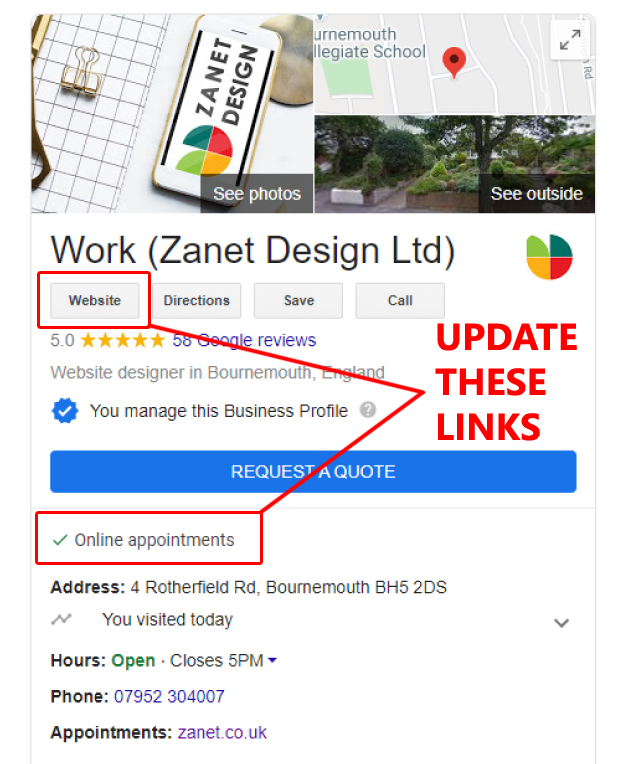
Finally, my favourite tip. The easy way to add a Facebook link in Google My Business Knowledge Panel. This is a case of literally taking your Facebook business URL and adding that to the World Wide Web icon in GMB as the external website link.
Also, you can use a link from GMB to the Facebook calendar for taking bookings. Don’t miss that amazing little tip as it’s only just become available
Summary: Google My Business and Facebook
Google My Business is powerful marketing, SEO and advertising tool. it is way ahead of Facebook but when combined can prove a very strong way to encourage new enquiries for all business large or small.
Take advantage of the fact that Google My Business is still free. I’m sure this will change soon. Google rewards active GMB listings with a lot of traffic and genuine local enquiries from real clients. So its worth the investment of your time or having it managed by an expert.
What Next?
Google My Business is for those businesses that want to target local clients and customers. If you need expert help in registering or creating a Google My Business account, then contact me at Zanet Design for me to arrange to help you.
Want to start doing it yourself?
Head over to the popular How to Max Out Google My Business