


Google My Business performance is easy to do if you know where to look. It’s just got a whole lot easier with my latest 5 tips for 2021 focus.
Increase performance on Google My Business by optimizing your listing with a real focus. Did you know there are several ways to focus on what Google is going to reward next in 2021. Often it’s right under your nose, but we can become blind with familiarity or worse still, not know where the 5 areas are. This video will be like putting on glasses, it will give you clarity and focus for your business.
Increase Performance on Google My Business Video
Unlike our previous, Scooby-Doo themed mystery, there are no red herrings this time round. The clues are there all the time, literally right under your nose.
Google My Business Increase Performance Timestamps to Video above
// TIMESTAMPS
- 0:00 Introduction to Google My Business Tutorial
- 0:24 What this video will do for your performance
- 1:24 Emails will tell you how to increase performance
- 2:45 Use Google to get more business clues
- 4:26 View Google’s plan for you
- 5:35 The completion of your Google My Business profile
- 8:00 Google Your Business literally
- 10:15 The blue button and other bonuses
These 5 letters will also help Increase Performance on Google My Business In 2021
Additionally, you will be able to discover my magic 5 letters to get you to help every time you get stuck!
“Zanet” Google currently gives many hints on what is going to get you increased performance. In fact when I get stuck i actually do that. I cant remeber everything ive dicoovered and shared over the past few years, so i Just add the ZANET to any search and immediatley it takes me to the right tutorial. Try it, it works a treat!
“A clear focus and adding useful content along with consistency will boost any Google My Business profile
Zanet Design
Even with all these tutorial and tips, I find so few of my customers look at the very things under their nose So lets take a look at 5 places the glasses are under your nose!
Read and apply Your GMB emails These are sent to help you Increase performance

These emails for Increase performance on Google My Business are always overlooked – see 1:24 Emails will tell you how to increase performance
Search on Google for the phrase “my business”

Google or search on Google for the phrase “my business” literally. See 2:45 Where I use Google to get more business clues

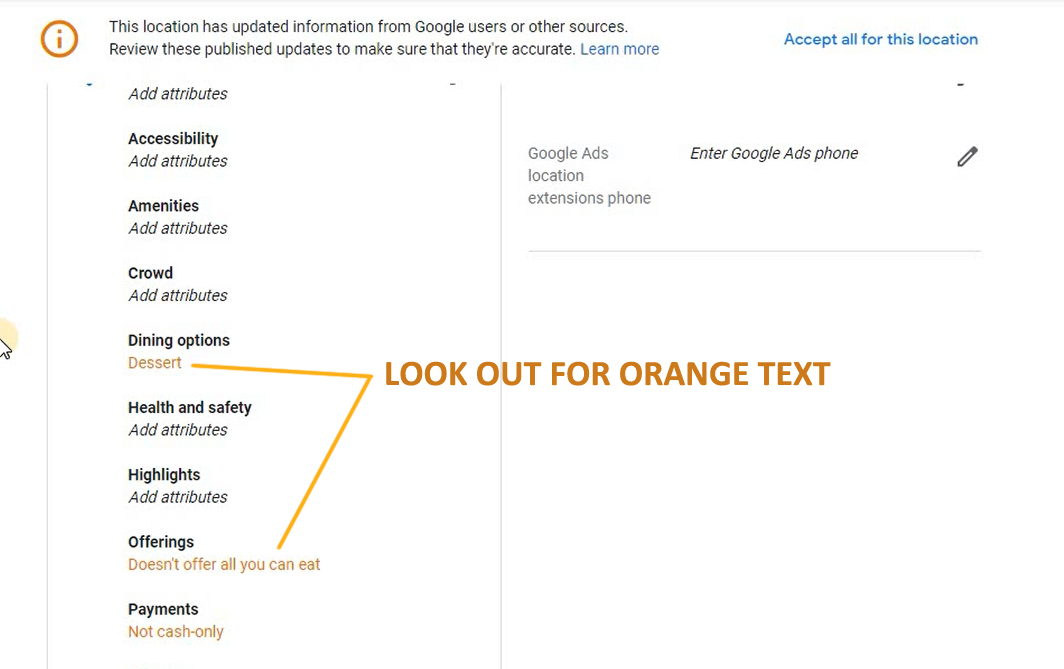
Literally Google “my business” Visible only to you, but pay attention to …any major issues -show – red dot / updates / orange text
Read this and it will become clear: How to optimize google my business
The above issues are explained in this excellent video tutorial
& Seize More Sales
View Googles GMB Plan

The 3rd strategy is to look at Google’s bespoke plan for your listing. The “View Plan” is often shown as a blue button when you log in and also shows itself on the right-hand side of a desktop view after a few seconds.
To see this in action 4:26 will help you view Google’s plan in the above video tutorial
This direction is designed to help you know what is next. Follow the icon link for Increased performance. When you log in to View plan, sometimes it throws itself at you annoyingly even if you have followed everything. I’m sure this will disappear for good one day.
Complete your Business Profile

This is a tricky one as Google has really messed this up. If you want to see the mystery of the 85% logo then watch this video first:
How To Setup Google My Business For Maximum Results
Complete your Business Profile A percentage mainly for making sure you set up correctly.
Now if you have 80% or 85% due to a logo then there is a reason for this Below and you can watch the mystery unravel at the end of this video. Head over to 5:35 For my effort to fix a completion to my Google My Business profile
Google Your Business literally

The fifth strategy of increasing performance for your Google My Business listing is to Google literally the name of your business. In my video example, I use Caesar’s Fine Dine Restaurant Only managers of this profile can see this Why is Google putting the focus on this? It wants you to do these things and will reward you! See the video at 8:00 for the way I did this
BONUS BLUE BUTTON

Bonus blue buttons are scattered everywhere after you login into your business backend. For example, in the video, I show you a few on 10:15
How To Increase Performance on Google My Business for 2021 Conclusion
In summary, these 5 suggestions in the video above will have a massive impact over the next few weeks. You then need to apply this on a regular basis. Additionally with regular tips from my Zanet YouTube Channel should combine and have a massive impact on your Google My Business rank for 2021.
So now what? Well, it’s now about improving the finer details. To do this head over to this popular article called “Google My Business Secrets“. The surprise was that few local businesses really knew this information and suddenly my Youtube videos were in demand. Designed by real local businesses wanting to do the right thing and find genuine clients. This video below will help you rank in Google Maps.