


I’m going to answer the question regarding deleting your entree and show you “How to Delete Google My Business”.
Google My Business is one of the gifts from Google that is absolutely perfect for being found by other local customers. It gives you a map listing and enables you to bee seen at the top of local search engine results. But what happens when your entree is wrong. What happens if you add a location by mistake?
If you havent already done so then you must take a look at our popular google my business secrets where we reveal all the latest GMB tricks.
To answer this question, I’ve made a video and put together a simple step by step guide. The videos is going to show you how I went about deleting my business entree. I’m using the very latest version of Google My Business, as most of the videos on the internet are using an older version and it doesn’t make sense when you follow it. Lets take a look at the video right now.
How to delete your Google My Business entry video.
Here is the video timestamps to make it easier for you to get directly to the answer
- 0:10 The question raised, How to Delete Google My Business
- 0:55 Google My Business is important
- 1:26 Login screen
- 1:42 Business location
- 2:00 How to Delete Google My Business
So lets look at some screenshots and see the easiest way to delete your Google My Business.
So let’s remind ourselves that Google My Business is a powerful SEO tool. It’s a real gift that’s
been given to businesses particularly if you want to benefit in a local way. But a wrong entree could be a disaster for your business. So what happens when you’ve put a wrong entry in and you just want to delete it?
Sign in to Google My Business
To start with you need to login to Google My Business. Sign in as you normally would and then you’ll come up with your locations and maybe your businesses you’re running.

Now go to the location that you’re going to delete (so in this case I’ll go to my business location) and there under actions you now can do several actions on the drop down menu.
Locate the business you want to delete
One of the things you can is you can transfer location. So maybe that you’re just moving offices and rather than delete it you want to transfer but actually the one that you may want to go for is either permanently closed or even remove location. Now remove location! I’m not going to do that because that would close and remove my business altogether!
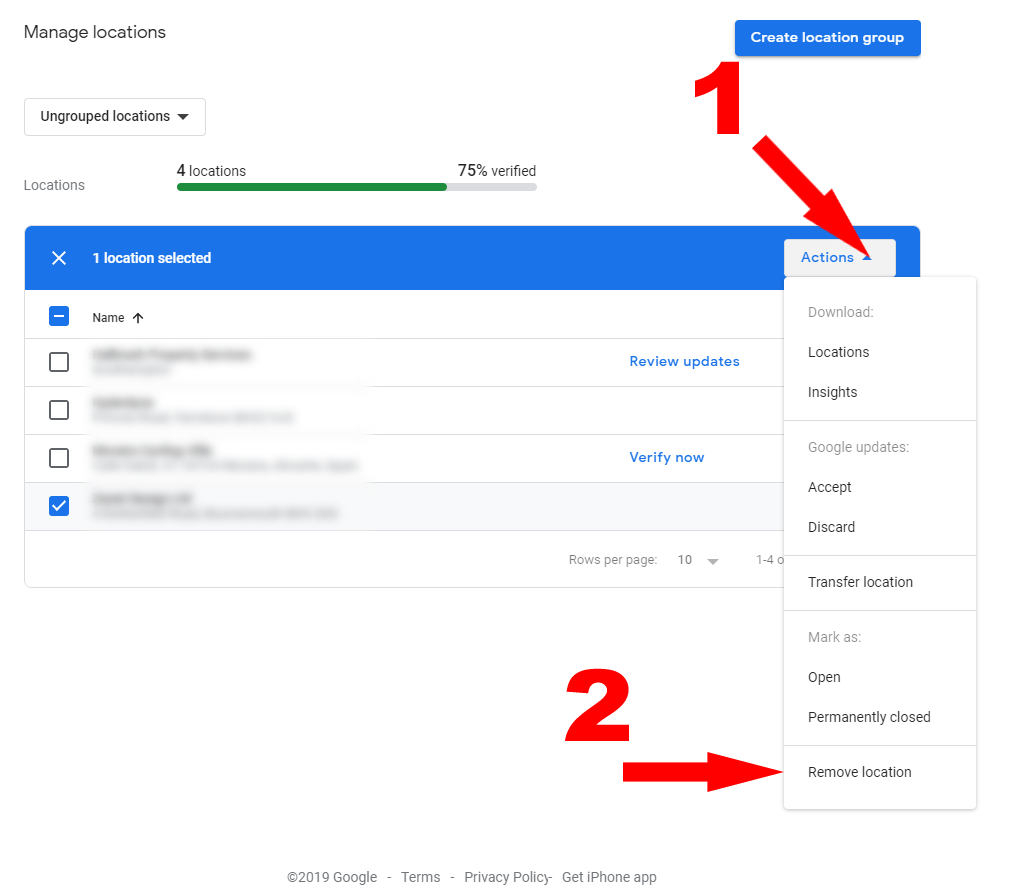
But by pressing remove location, in effect, that’s deleting that entry now.
Why doesn’t the Google My Business Disappear straight away?
You may say, well Google is still showing it weeks or months later. Of course Google will still show entries. As things don’t always get removed straight away. But that’s under Googles control. You have done your part. You just have to wait. for them to approve the deletion. Before I forget, this is Googles latest release – its called Google site kit wordpress plugin its well worth the download, just visit the link.
So I hope that’s been useful for you. There are many other tips I have on my YouTube channel and on this blog, so make sure you bookmark, link and subscribe and hopefully you can join me again soon.